What's new up to 27 September
These are the changes made between the first tournament and the tournament of 27 September. For what came after it, see What's new since 27 September.
Thank you to everyone who played the first tournament. Your feedback shaped most of this page. These are the changes you will notice.
Before you join
Use exactly the same name as last time
A name belongs to one person in the club. Capital letters and extra spaces do not
count, so Alex and alex are the same name. If you type a name that is already
taken, the form keeps what you typed and tells you.
If you played last time and the name is yours, do not invent a new one. Choose That's me on the form, and follow the steps below.
Getting back in as yourself
You need this if the organizer added you, or if you joined last time in a browser and now want to play from your phone. It is a one-time step.
- Select That's me. If you saved an email address in your profile, you can sign in with it and skip the rest.
- Otherwise ask the organizer for a personal invitation.
- At the venue: ask the organizer in person. They show you a QR code. Scan it with your phone.
- Somewhere else: select Share request and send the message privately to the organizer. The organizer sends you a link privately. Open it on your phone.
- Select Sign in as your name. Your phone is now signed in as you. Select Join as your name, or continue if the organizer already added you.
A personal invitation works once and expires after 24 hours. Anyone who has the link can sign in as you, so never post it in a group chat. Signing in on your phone does not sign you out on your other devices.
Everything you need in one page
After you join you land on the Me page. It is deliberately simple. It shows your current status, such as waiting for the tournament to start, where you play and with whom, and lets you enter the result of your own match. That is all you need to do.
When your match is over, tap the team that won, whether that is your team or the other one. Tap it again if you made a mistake.
| Blue team won | Yellow team won |
|---|---|
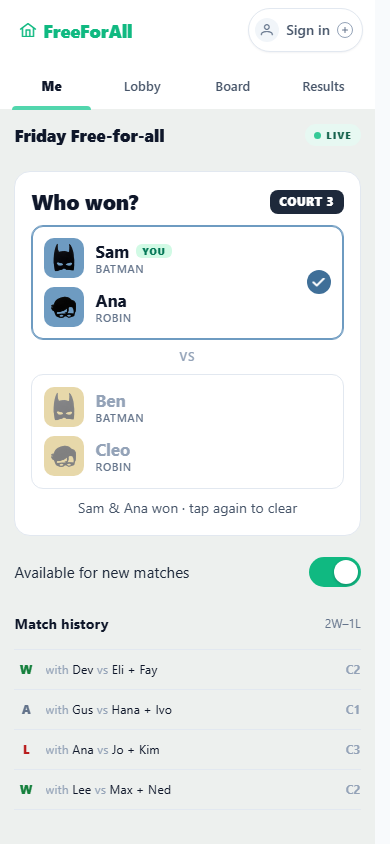 |
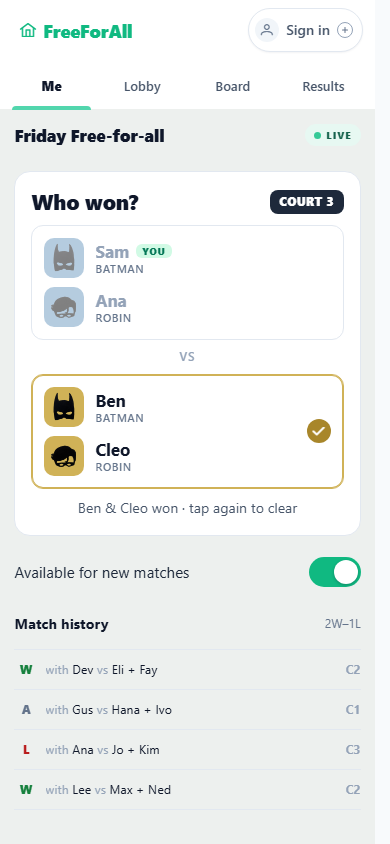 |
Not playing the next match? Switch off Available for new matches.
At the venue
- Check-in. When you arrive, the organizer marks you as present. The tournament starts only when everyone who signed up is present. If you cannot come, tell the organizer.
- Waiting for approval. If you join through the link after the tournament has started, you wait in the Lobby until the organizer accepts you. The screen says so.
Fairer play
- Starting order. You are placed in the order when you join, using how you did last time. New players start in the middle, at a random place among equally rated players. The organizer can still change the order before the start.
- Who sits out. The app now chooses who sits out much more carefully. Nobody sits out twice while another player has not sat out yet. Most important, it tries to avoid broken promises (for example, you win but are not promoted because of who sits out). As a bonus, it also tries not to bench someone right after they won. Sometimes it cannot be avoided, for example in the last round. Read why.
Ranking together
The organizer can now invite other people to help put the players in order, so it does not rest on one person. Anyone taking part does it on their own phone, and everyone sees the moves as they happen. This helps because people know different players: one person knows one training group well, another knows a different group.
You never rank yourself. If you are asked to take part, you see everyone except you, and you cannot move your own place. The organizer finishes the ranking with Done, or discards it with Cancel.
For organizers
- Reorder together lets you choose who takes part. Admins are ticked by default; tick others to include them. It is available while no court is active.
- Invite a returning player in the Lobby creates a personal invitation for a player from the club's list, without adding them to the tournament.
- Send personal invitation in a player's menu gives a player who is already in the tournament the same invitation, for example a player you added who now wants to use their own phone. It replaces Invite to claim.
- A ranking update can be undone.