What's new since 27 September
These are the changes since the tournament of Sunday 27 September: the things you will see, not the repairs underneath. Most of them are choices about how a tournament should feel rather than how the app should work, and those choices are still open.
The Results tab is now Standings
It was renamed because Results could be read as the place to enter your own. It is not: a result is recorded on the Board, where most of them are entered, or on your own Me page.
Standings tells you who is winning right now. It is one list with every player in it, the leader's row lifted out of the order. Each row shows your position, your name, a bar of matches won out of matches played, how far you have moved up or down, and your win percentage.
The pills at the top reorder the list. Rank puts it back in ladder order, Played, Move and Win% put the highest first, and choosing the same pill again reverses it.
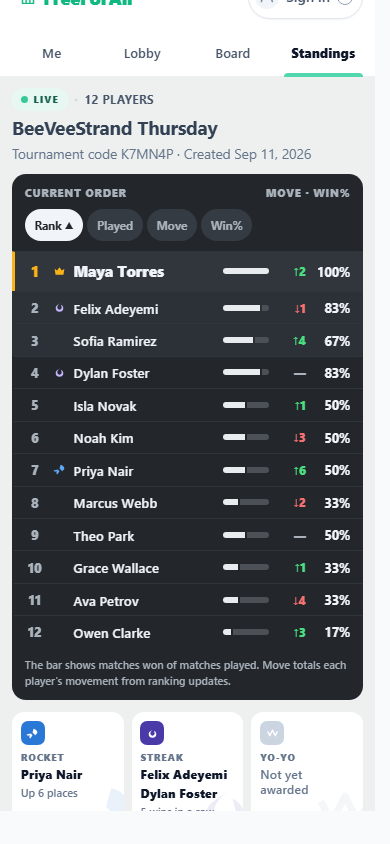
The list moves only when the organizer selects Update Ranking. A result that has been entered but not yet processed is visible on the Board, not here.
Below the list there are three awards. They were easy to calculate, which is the wrong reason to choose an award, so treat them as a trial rather than a decision.
- Rocket — the biggest climb up the order.
- Streak — the longest run of wins.
- Yo-Yo — the longest alternating run of wins and losses.
A run shorter than three does not count, so all three sit empty and grey early on. Nothing breaks a tie: everyone level holds the award, nobody holds it if more than three tie, and each holder carries the badge in their own row, which is the only way to find the Streak and Yo-Yo holders.
Choosing your level when you join
If the club has no rating for you yet, joining asks you one more thing: your level. Every club has exactly five.
| Level | Starting rating |
|---|---|
| Beginner | 660 |
| Improver | 830 |
| Intermediate | 1000 |
| Advanced | 1170 |
| Expert | 1340 |
The gap between two levels is not arbitrary: it is set so that two players of one level beat two players of the level below about four times out of five. A club can rename its five levels and change their starting ratings, but cannot add, remove or reorder them.
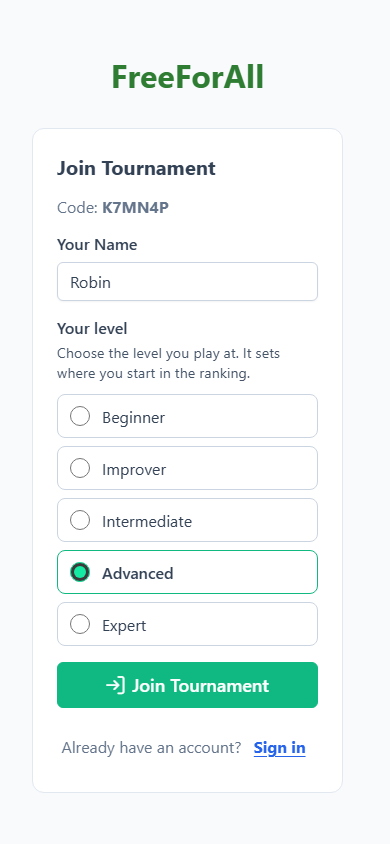
Your level decides where you enter the order at the start. Players who end up on the same value take a random place among themselves, the organizer can still change the order before the start, and the organizer picks the level for anyone they add by hand.
It writes nothing to your club rating. That is confirmed later, by the organizer, when the tournament's results are published — and the level you chose is what gets suggested there.
A level is a self-assessment, so the place it gives you is often wrong. Your name therefore carries a beige NEW badge in the Lobby and on the Board until you have a result in this club, as a cue to the organizer, who is the only one who can move you. It clears itself after your first processed result. It says you are new, not that you are weak.
Your club rating
You can now see your own club rating, as one number labelled Club rating.
It is not your Tournament Rank. Tournament Rank is your place in this tournament's ladder: it starts from your rating, moves every time a result is processed, and is gone once the tournament ends. Your club rating is the club's longer view of you across tournaments, and live play never touches it — it changes only when the organizer publishes a tournament's results to the club afterwards, as a separate step. So a tournament where everything went wrong costs you nothing until that happens, and a tournament that is never published never counts.
The club page
Every player of a club now has a club page worth opening. You get there from Your clubs on the home page, or from the club name in the header while you are in a tournament.
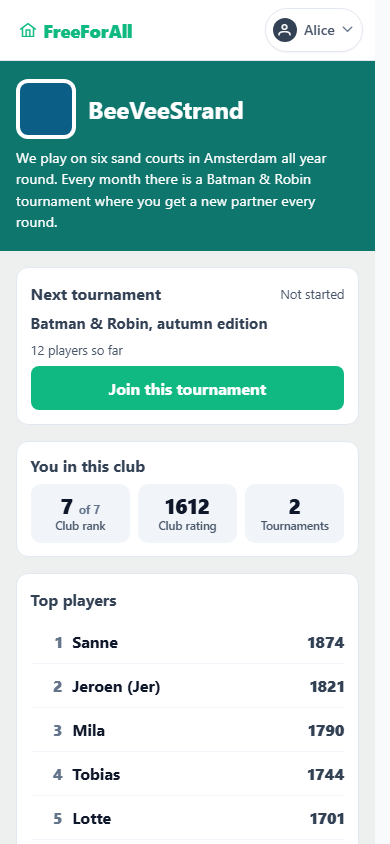
It holds four things:
- Next tournament. A tournament of this club that has not started yet, with how many players have joined. If you are not in it, Join this tournament — the first way to join without a link or a QR code, because the page already knows you are one of the club's players.
- You in this club. Your club rank, your club rating, and how many of the club's tournaments you have played. Before the club has published any ratings these show a dash.
- Top players. The club's top five by club rating, plus your own row if you are below them.
- Tournaments. Every tournament of the club, with its date, its size, and who came first, second and third. You can open the ones you played.
Only the club's own players can open it, and joining one of its tournaments is what makes you one. Anyone else is shown nothing of the club, not even its name. Of the ratings, you see your own and the top five, never where everyone else stands.
Focus mode on your own page
When you join, the app opens your own page and nothing else: no header, and no green bar with Me, Lobby, Board and Standings. This is focus mode.
It is not a trap. The green Focus mode ✕ button at the top right brings everything back, and so does the back gesture on your phone. Turn it off once and that phone will not get it again.
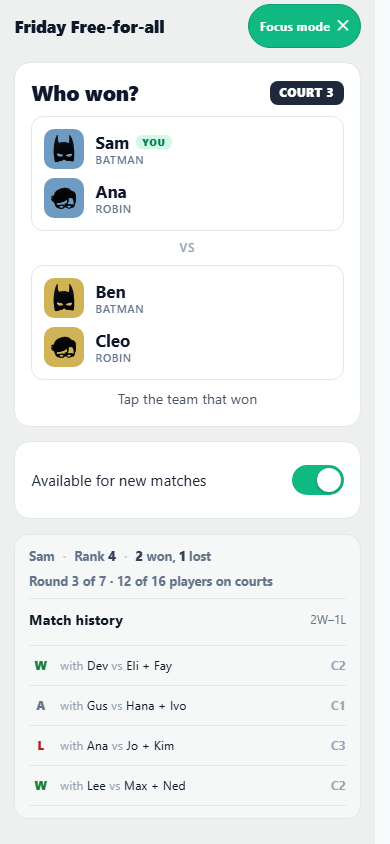
The page is three blocks, always in the same order.
- What is going on, and what is expected of you. One line. You are on the bench. Waiting for the next round. Who won? — and under it a small green line reading Just wait — this page updates by itself, so a quiet screen is clearly a quiet moment rather than a stuck app.
- Available for new matches, always in the same place.
- Everything that is only interesting: your rank, your record, which round the tournament is in, how many of you are on a court, and your match history. It is deliberately the quietest block on the page, because none of it needs doing.
That first line also changes colour: amber when you are unavailable, reading Paused — you are not being put on a court, and red when the app cannot reach the server.
The round count and automatic ending
The organizer's Update Ranking button carries the round: Update Ranking 3/7 is three rounds played of seven expected. Your own page shows the same count — Round 3 of 7 · 12 of 16 players on courts.
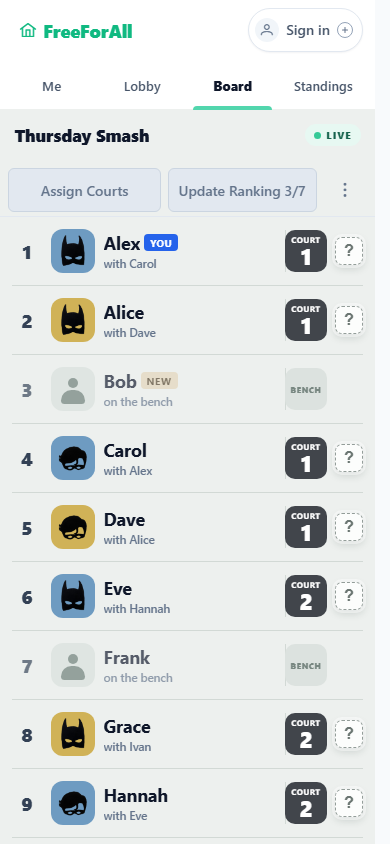
A round is one press of that button, which is why the count sits on it. For Batman & Robin that is the round number exactly. When the organizer resolves one court while the others play on, it climbs faster than games each player has played.
When the expected rounds are played, the tournament ends by itself — never while a court is still in play, and never while somebody is waiting to be let in. The organizer can raise Expected rounds to carry on, or reopen an ended tournament with everything intact.
Expected rounds now starts at 7. It decides when the tournament stops, so it is worth setting to what you actually intend to play.